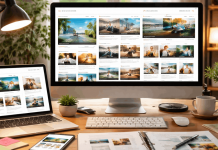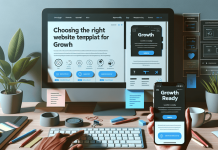
A website template gives a site a usable start. It suits portfolios, service pages, sign-up pages, and small blogs.
Faster launches come from fewer decisions, not incomplete information. This guide shows how to choose, test, and maintain a template without looking generic to first-time site visitors.
Templates Remove Setup, Not Responsibility
Templates provide structure for pages, navigation, and spacing. They still need editing before representing a real project.

The Prebuilt Layout Saves Early Decisions
Most templates include a header, footer, sections, and mobile layout. That lets you focus on message and action instead of building boxes.
A photographer might replace sample galleries with selected work and contact details. The prebuilt layout creates a starting point, not a finished brand.
Fast Setup Can Hide the Wrong Fit
A polished demo can make any template seem suitable. Trouble appears when it expects a large image library, long sales page, or unneeded features.
A local repair service may need prices, service areas, and a request form, not a video banner. Seeing this trade-off early avoids forcing content into another person’s design assumptions.
Match Templates to Visitor Tasks
Start with the task visitors need to complete, not the most attractive preview. That connects the site goal to needed pages, content, and tools.
Choose Pages Around Real Information
A portfolio may need an introduction, selected work, case notes, and contact details. A consultant may need services, booking, credentials, and common answers.
List must-have pages before browsing, then skip designs needing major rearranging. A template should lead visitors to useful details, not decorative sections.
Check Mobile Behavior Before You Commit
Open the preview on a phone and inspect navigation, buttons, headings, image crops, and forms. A desktop layout may leave mobile visitors with crowded text or difficult controls.
Test sample forms and see whether the next action remains easy to find. This mobile check matters because many visitors arrive on a phone.
Also Read: Website Builders for Low-Budget Projects

Replace Demo Content Early
Demo copy can hide missing information. Replace placeholder content early so design responds to your priorities.
Write the Essential Content First
Begin with headline, purpose, service details, contact method, and proof visitors need. Add real images or labeled placeholders, then see where the layout needs clearer titles.
The official Webflow template library shows how templates can be customized after selection, but accurate details remain your responsibility.
This content-first approach shows whether the layout supports your message or only makes demo material attractive.
Remove Sections That Create Doubt
Delete empty testimonials, made-up statistics, irrelevant team blocks, and social links you will not update. They can make a new site feel unfinished or less trustworthy than a shorter page with facts.
A small restaurant does not need an investor section, and a personal portfolio may not need a price table. Removing unused sections creates a cleaner path and fewer maintenance tasks.
Keep the First Version Narrow
A launch does not need every future feature. It needs purpose and working details for visitors.
Build Around One Main Action
Choose the most important action: booking a call, buying one product, reading an article, or sending an inquiry. Place it in navigation and repeat it once visitors have enough information.
Avoid competing buttons for unrelated downloads, accounts, or mailing lists. A single primary action gives the site focus and offers a useful signal after publication.
Add Tools Only When They Solve a Real Need
Booking widgets, chat tools, pop-ups, and animations can help. They can also slow the page, raise costs, or distract from a simple message.
Ask what problem each feature solves and who will maintain it next month. That protects the first release from feature overload and keeps the site stack understandable.
Check Before Publishing
A short review catches problems templates cannot show. Test the finished content, not only design.
Check these launch essentials:
- Mobile: buttons and text are readable.
- Forms: messages arrive correctly.
- Links: pages open correctly.
- Images: files are clear and relevant.
Test the Site Like a New Visitor
Open the published preview in another browser or private window. Try to find the main offer, read key details, and complete the form without editor knowledge.
Ask another person to do the same task and note where they hesitate. Their first impression can reveal unclear labels, missing details, or a broken link you no longer notice.
Check What Will Need Updating Later
Look for dates, prices, opening hours, staff details, legal pages, and promotional banners. Decide who updates each item and where original information comes from.
A template is easier to maintain when content has a clear owner, even for one person. This update plan prevents an attractive launch from becoming an outdated website.
When Templates Are Not Enough?
Templates work when speed, clarity, and familiar pages matter. They fit less when projects need unusual interaction or control.
Custom Features May Change the Decision
A site with account roles, live inventory, advanced calculators, or specialized data rules may outgrow a standard layout. A template can still support an early landing page, but it is not the complete product.
Review integrations, permissions, and maintenance needs before paying for a design that cannot support them. This early review separates a fast marketing site from a complex digital product.
Branding May Need More Than a Theme
A growing business may need original photography, custom illustrations, or more flexible page patterns later. Starting with a template does not prevent that work; it provides a temporary home while you learn what visitors respond to.
Keep copies of text, images, and important settings so changes are easier later. This flexible mindset lets a template support progress without becoming a permanent constraint.
Conclusion: Launch, Then Improve
Templates work best when they reduce setup without hiding decisions. Choose one that fits the visitor’s task, replace demo elements, and test the essential path on real devices.
Keep the first version simple enough to update, then review what people actually use. A thoughtful launch is more valuable than a fast one that leaves visitors unsure what to do.